

FlexiSchedule
Schedule one-off and recurring events that set or trigger controls anywhere in your Q-SYS design. Operators create and manage events from a UCI. It runs entirely on the Core, with no network or external calendar needed.
This product isn't available yet.
Email me when it's releasedDescription
Scheduling for Q-SYS, built for operators
FlexiSchedule turns any Q-SYS design into a scheduler. Integrators set up the controls once. After that, operators create, edit and delete their own events from a UCI, with no need for Designer, Administrator, a programmer or a call-out.
How it works
- Set up your actions. On the Actions page, choose the controls that events will act on. A set action recalls a value, such as a gain level, a source selection or a mute state. A trigger action fires a control, such as a snapshot recall or a button press.
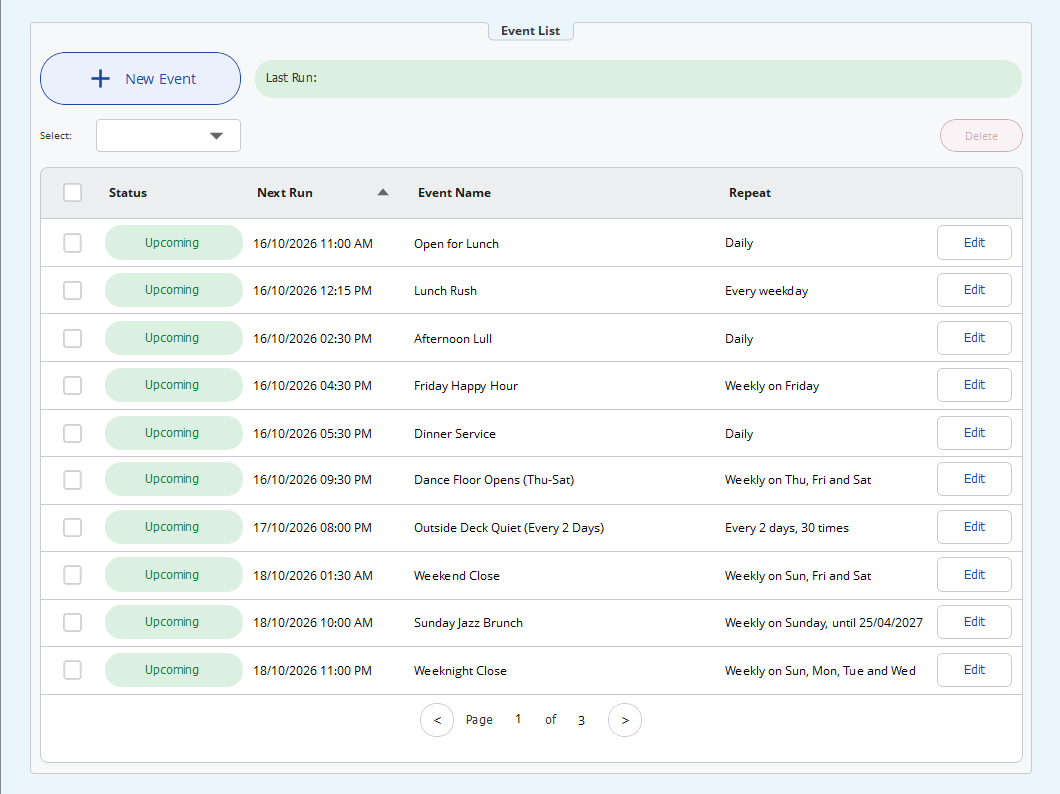
- Start from the included UCI template. FlexiSchedule comes with a ready-to-use demo UCI. It includes the event list, the event editor, a date-picker calendar, custom repeat options and a delete confirmation, already laid out and wired up. You can use it as it is, restyle it to match your panels, or copy the parts you need into your own UCI. If you’d rather build your own, the same layers are also on the plugin’s pages.
- Operators schedule events. Give the event a name, pick a date and time, choose how it repeats and set the values it should recall. FlexiSchedule handles the rest.
Features
- Flexible repeats: does not repeat, daily, weekly, monthly by date or by weekday (for example "second Tuesday" or "last Friday"), annually, every weekday, or weekends. A custom option covers every N days, weeks, months or years, on chosen days, ending never, on a date, or after a set number of runs.
- Set or trigger any writable control on any component that has Code Name and Script Access enabled.
- Easy for operators: a sortable event list with paging, bulk select and delete, a calendar date picker, and time entry that understands "0930", "9:30pm" or "noon". When an event can't be saved, a clear hint says why.
- Self-checking: if a saved action breaks, for example because its target component was removed from the design, the plugin marks the events that use it as Compromised and explains what to fix. Nothing fails without warning.
- Event history: a log of event runs, completions and removals, kept in a text box for your UCI or written to the Core's event log.
- Status reporting: an OK, Compromised or Fault status with a description of each problem, ready to wire to your monitoring.
- Backup and transfer: the whole schedule is stored as JSON. Copy it out to back it up, or paste it into another system.
- Local formats: 12-hour or 24-hour time, a choice of date formats, and a configurable first day of the week.
- Self-contained: it runs on the Core's own clock, with no internet connection, external calendar or third-party service.
“What’s included
- FlexiSchedule plugin
- Demo UCI template & CSS Stylesheet
- Demo Q-SYS Designer file
- Help document (F1 help when installed from the Q-SYS Library)
Requirements
- Q-SYS Designer 9.10 or later
- Code Name and Script Access enabled on each component you want to schedule
Licensing
Each licence covers one running instance of FlexiSchedule and is locked to one Core. Every instance needs its own key. Try before you buy: without a key, the plugin runs as a trial for two days on a Core, or for 60 minutes in Emulate.
Get update emails
We'll email you when FlexiSchedule is released, and when new versions come out. Unsubscribe at any time.